
BRZ 365 WebHooks
WebHooks in BRZ 365 provide a simple, reliable, and scalable mechanism for external systems to receive real-time updates about important domain events - without the need to continuously poll our Public API.
By subscribing to WebHooks, external applications can automatically react to changes in BRZ 365 (such as business-partner updates, invoice-document creation, or workflow state changes) and seamlessly synchronize data across systems with the help of our public API.
What are WebHooks?
A WebHook is a lightweight HTTP callback that enables one system to notify another when an event occurs. Instead of requesting data periodically, your system registers a URL endpoint that BRZ 365 will call asynchronously when relevant events happen.
In other words:
You tell BRZ 365 “Call me when this event happens.”
BRZ 365 then sends an HTTP POST request to your endpoint with event data in JSON format.
This event-driven model allows external systems to react immediately, reduce API calls, and stay synchronized efficiently.
Register a BRZ 365 WebHook
To register a WebHook in BRZ 365 you must be a administrator of your BRZ365 environment. Therefore login and go to the Webhooks-Management-UI.
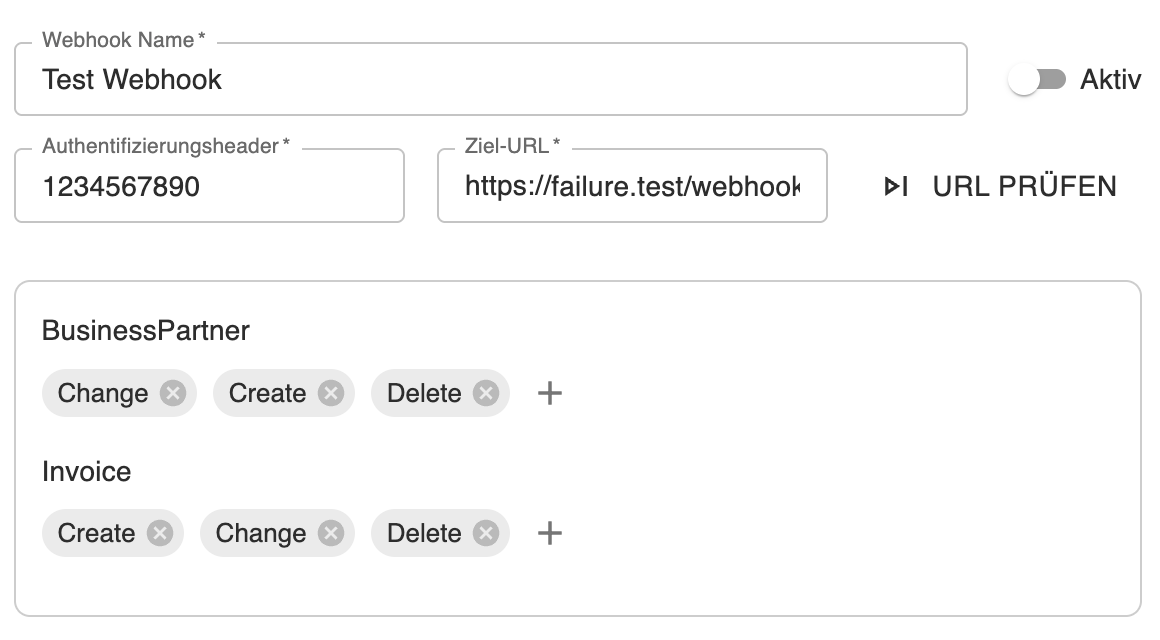
Webhook Name*:
You can define a name for your webhook. The name must be unique.
Authentifizierungsheader*:
You have to set a secret value. This value is in the Authorization Header of the HTTP POST request / HTTP callback. You can verify the sender (BRZ365) of the POST request.
Ziel-URL*:
The Callback-URL of the Webhook. Your Callback-URL must:
* be public accessible over HTTPS
* accept HEAD and POST requests with application/json in the body
* return a 2xx status on success (send it quickly; process work asychronously)
* check the Authorization Header to verfiy the sender
Events*:
You can filter the different domain models and the associated domain events.
BRZ 365 WebHook Event Payload
The payload of each event has the following format:
POST /webhook-callback HTTP/1.1Host: your-host.deAuthorization: your-secret-value-for-the-registered-webhookContent-Type: application/json
{"licenseOwnerId": "596ad63d-efa1-426e-dd93-08d9fa9598be","organizationId": "0e288eb6-3e87-42f7-a7ad-d793b5cac5ef","event": "create","entityName": "BusinessPartner","entityId": "9154afa-258d-4fdc-8fa2-4a719675fe83","timestamp: "2025-11-07T14:32:45Z"}
licenseOwnerId:
The uuid, which identifies your BRZ365 environment
organizationId:
The uuid of the organization where domain model belongs to.
Remark: OrganizationId is optional! It depends on the domain model. The following list describes the presence or absence of the organizationId.
OrganizationId is set when ...
... BusinessPartner is created or deleted
... Invoice is created, changed or deleted
event:
Enum value identifying the trigger. Can be create, change or delete
entityName:
Name of the domain model
entityId:
Identifier of the associated domain model
timestamp:
The utc timestamp the event occurs.
How a BRZ 365 WebHook works
Some helpful information about reliability and retries. Keep in mind: Design your service to be resilient:
Duplicates: A delivery for the same event can arrive more than once. Make processing idempotent (for example, track processed events).
Respond fast: Return a 2xx as soon as you receive the event, then handle your processing work asynchronously. Our request timeout is 5 seconds.
Retry/backoff: On failures (non‑2xx, timeout, or connection issues), deliveries pause and retry with exponential backoff (starting at 1 second, up to 512 seconds). After 10 retries, the event are marked failure.
Best Practices
Return fast: respond 2xx quickly and process work asynchronously to avoid timeouts.
Be idempotent: keep duplicates in mind and use the entityId and timestamp to identify duplicates and process it as required.
Secure your endpoint: HTTPS only, rotate secrets, and verify the Authorization header.
Log and alert: monitor failing deliveries and error spikes.